Blind XSS in Admin Panels: How a Simple Feedback Form Earned a $650 Bounty
A beginner-friendly deep dive into a Blind XSS vulnerability discovered in Rockstar Games' feedback system, showing how a hidden payload executed inside an internal admin panel and why these bugs are still so dangerous.
Disclaimer
This article is published strictly for educational and defensive security purposes.
All testing techniques described here must only be performed on applications you own or where you have explicit authorization, such as official bug bounty programs.No real user data should ever be accessed, stolen, or abused. The intent of this write-up is to explain why Blind XSS vulnerabilities exist, how to reason about them responsibly, and how developers can prevent them.
Introduction
When people hear the name Rockstar Games, they think of blockbuster titles like GTA V or Red Dead Redemption 2. They don’t think about a forgotten input field buried inside a feedback form.
Yet that’s exactly where a security researcher uncovered a Blind Cross-Site Scripting (Blind XSS) vulnerability that quietly executed inside Rockstar’s internal admin panel - and earned a $650 bounty.
What makes this finding especially interesting is not its complexity, but its simplicity.
There was no race condition. No obscure encoding trick. No advanced exploit chain.
Just curiosity, patience, and an understanding of how admin dashboards consume user-generated content.
This write-up breaks down the bug from beginner to advanced level, explains why Blind XSS is so dangerous, and shows what both researchers and developers can learn from it.
What Is Blind XSS?
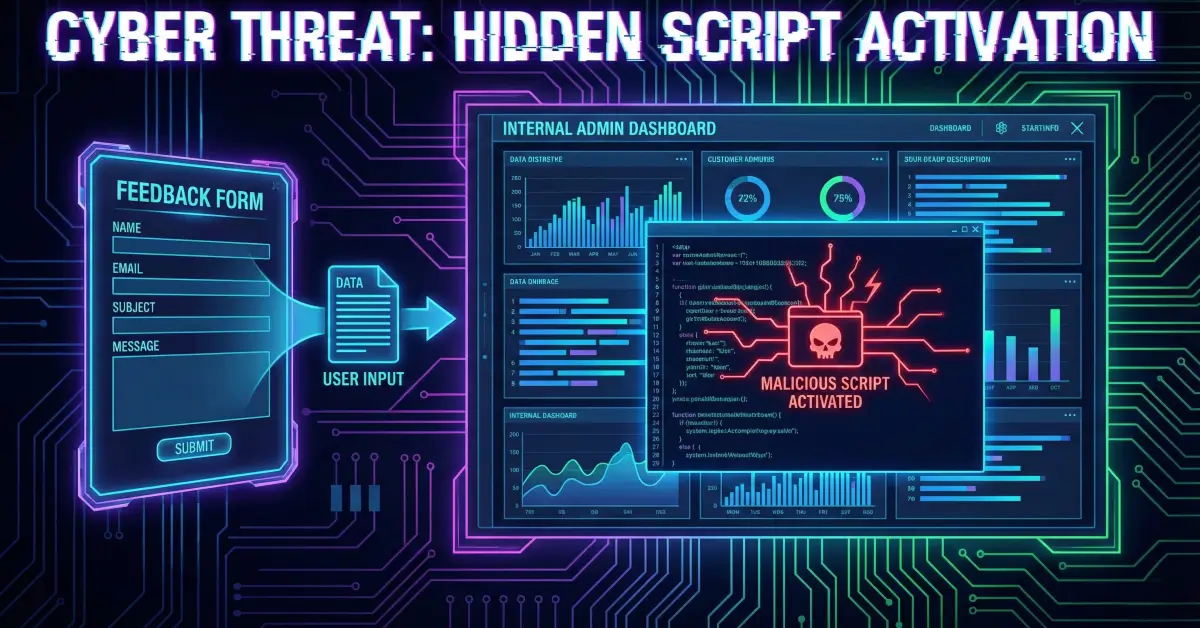
Blind XSS is a form of stored cross-site scripting where:
- The attacker injects a payload.
- Nothing happens immediately.
- The payload executes later, in a different context—usually when a privileged user (admin, moderator, support staff) views the data.
Unlike reflected XSS, you don’t get instant feedback like alert(1) popping up in your own browser.
Instead, the payload “phones home” using an external beacon (for example, xss.ht or interact.sh).
When that beacon fires, you know your payload executed somewhere you can’t see.
This makes Blind XSS especially dangerous in:
- Admin dashboards
- Moderation panels
- Support ticket systems
- Feedback and contact forms
- CRM tools
The Target: Rockstar’s Feedback Feature
The vulnerability existed in Rockstar Games’ public feedback system, often referred to as “Mouthoff to Rockstar.”
Endpoint:
This endpoint accepted user-submitted feedback, including fields such as:
- Name
- Age
- Subject
- Category
- Message body
At a glance, it looked like a harmless JSON-based form submission endpoint.
And that’s exactly why it was interesting.
The Initial Test: Submitting a Payload

The researcher submitted a request similar to the following:
From the user’s perspective:
- The form submitted successfully.
- No alert appeared.
- No visible error occurred.
To a beginner, this might look like a dead end.
To an experienced hunter, this is exactly what Blind XSS looks like.
Why Nothing Happened (At First)
The payload didn’t execute on the public-facing page because:
- The feedback form likely stores submissions in a backend system.
- Moderators review submissions through an internal admin panel.
- The vulnerable rendering occurs inside that internal interface, not on the public site.
This is a textbook Blind XSS scenario.
The payload sits quietly in storage until someone with higher privileges views it.
The Callback: Proof the Payload Fired
After some time, the researcher’s XSS beacon service received a callback.
That meant:
- An admin opened the feedback entry.
- The admin’s browser rendered the injected input.
- The script executed in the context of Rockstar’s internal domain.
At that moment, the vulnerability was confirmed.

Why Blind XSS in Admin Panels Is So Dangerous

Once JavaScript executes in an admin’s browser, the impact depends on the environment—but it can be severe.
Potential consequences include:
1. Session Hijacking
If admin cookies are not marked HttpOnly, JavaScript can read and exfiltrate them.
2. Privileged Actions
Injected scripts can:
- Approve or delete content
- Modify settings
- Create or remove users
- Trigger administrative workflows
3. Internal Data Exposure
Admin panels often expose:
- User IP addresses
- Internal comments
- Moderation notes
- Backend identifiers
4. Vulnerability Chaining
If the admin panel uses frameworks like AngularJS, unsafe rendering can sometimes be chained into:
- Template injection
- Sandbox escapes
- More severe compromise
Even if none of these are proven in a report, the risk alone justifies a serious bounty.
Why This Bug Was Easy to Miss
This vulnerability didn’t require advanced tooling or clever bypasses.
It hid in plain sight because:
- Feedback forms are considered “low risk”
- Input is often assumed to be harmless
- Internal dashboards are trusted too much
- Developers sanitize output for public pages—but forget internal ones
Many teams focus heavily on protecting customer-facing pages while assuming internal tools are safe.
That assumption is dangerous.
How to Think Like a Blind XSS Hunter
For researchers, Blind XSS hunting is about mindset more than payloads.
Where to Look
- Contact forms
- Feedback systems
- Bug report portals
- Support tickets
- Review and comment systems
- Upload metadata fields
How to Test
- Inject simple payloads first
- Use external beacon services
- Be patient—callbacks may take hours or days
- Log timestamps and payload IDs
- Never attempt data exfiltration
What to Avoid
- Don’t steal real data
- Don’t perform destructive actions
- Don’t escalate beyond proof-of-concept
Responsible demonstration is key.
Impact and Bounty
Rockstar confirmed that:
- The payload executed inside their internal admin review panel
- The issue represented a real security risk
- Proper remediation was required
For this finding, the researcher received $650.
This reinforces an important truth in bug bounty hunting:
Impact is not about complexity.
It’s about where your code runs.
Defensive Perspective: How This Should Be Fixed

1. Context-Aware Output Encoding
All user input must be escaped based on where it is rendered:
- HTML
- JavaScript
- Attributes
- URLs
2. Treat Internal Dashboards as High-Risk
Internal ≠ safe.
Admin panels often aggregate untrusted input and deserve extra scrutiny.
3. Content Security Policy (CSP)
A strong CSP can dramatically reduce XSS impact by:
- Blocking inline scripts
- Restricting external script sources
4. Defense-in-Depth
Even if one layer fails:
- HttpOnly cookies
- SameSite attributes
- Role-based authorization can limit damage.
Lessons for Beginners
This bug is proof that:
- You don’t need elite skills to find real vulnerabilities
- Basics still matter
- Curiosity beats complexity
- Simple tests scale surprisingly far
A beginner who understands HTML injection and where data flows can still find impactful bugs today.
Lessons for Developers
- Sanitize input everywhere—especially internally
- Review moderation and admin tools carefully
- Never assume “trusted” users remove the need for escaping
- Log and monitor unusual internal script loads
One forgotten field can compromise an entire internal system.
Final Takeaway
This $650 Blind XSS wasn’t about genius or luck.
It was about asking a simple question:
“Where does this input end up?”
Blind XSS vulnerabilities remain some of the most underrated—and most dangerous—issues in modern web applications.
If you’re a researcher, keep testing the boring stuff.
If you’re a developer, treat internal tooling with the same care as public pages.
Sometimes, the friendliest forms hide the sharpest edges.
References
- OWASP: Cross-Site Scripting (XSS)
- PortSwigger Web Security Academy – Stored XSS
- OWASP Cheat Sheet: XSS Prevention
- CWE-79: Improper Neutralization of Input During Web Page Generation